ChatGPT Killed Codex? The Truth About OpenAI's Coding Tool Identity Crisis

What Actually Happened: The Timeline
If you've been following the AI coding tool space — and honestly, who isn't these days — you've probably seen the hot takes flying around: "ChatGPT killed Codex," "Codex is dead," "RIP OpenAI Codex." The discourse reached fever pitch after OpenAI's last update cycle, and I've been watching this drama unfold with a front-row seat for the past six months.
Here's what actually happened, stripped of the Twitter hype:
OpenAI didn't kill Codex. They absorbed it. There's a difference, and it matters.
When Codex first launched as a standalone product integrated with GPT-5.6 Sol (I covered this extensively in my Codex integration review), it was positioned as a separate tool. You went to a different URL, used a different interface, and submitted tasks in a fundamentally different way. It felt like using a CI/CD pipeline — powerful, but disconnected from your daily workflow.
Then, over the past two months, OpenAI started quietly moving Codex's capabilities into ChatGPT's main interface. First, it was the ability to run code directly in conversations. Then came background agent mode. Then multi-file editing. Each feature that made Codex special showed up in ChatGPT, often with improvements that the standalone product never had.
The standalone Codex dashboard still technically exists. You can navigate to it. But it feels like visiting a restaurant after the chef has moved to a new location — the building is there, but the magic isn't.
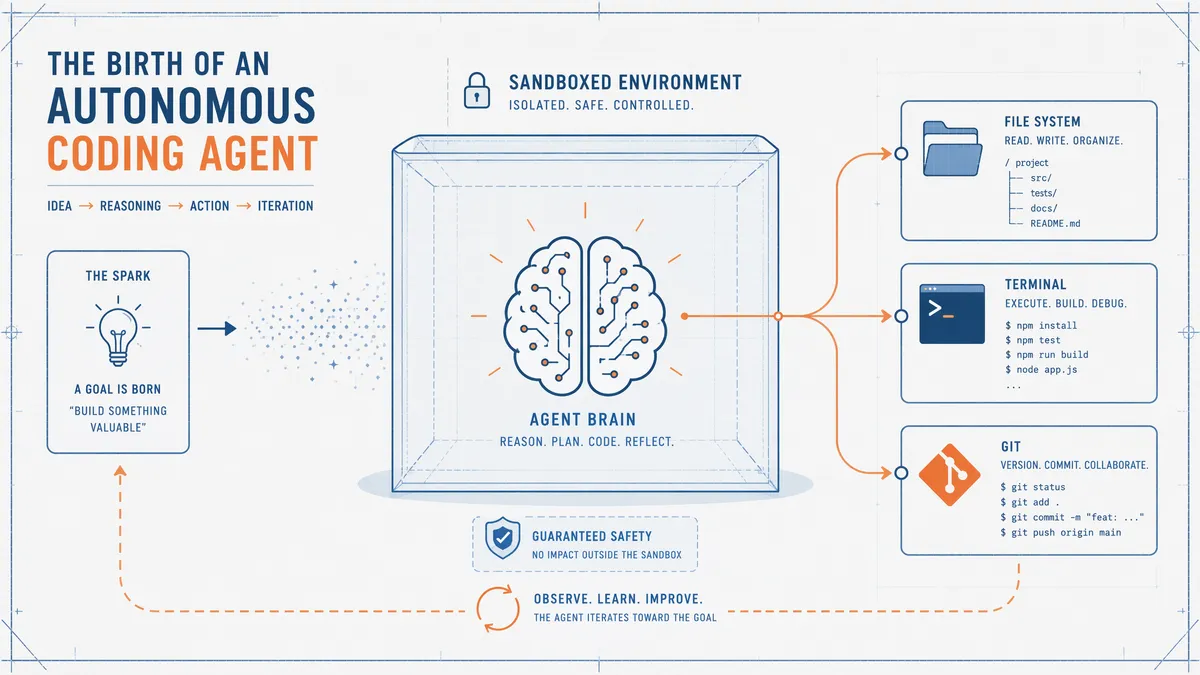
Codex's Origin Story — Why It Existed in the First Place
To understand why this matters, you need to remember why Codex existed as a separate product at all. And honestly, the reason is kind of embarrassing for OpenAI.
When GPT-5.6 Sol launched, its coding capabilities were genuinely impressive but had a critical limitation: the chat interface wasn't designed for autonomous, long-running tasks. You couldn't just tell ChatGPT "go refactor this codebase" and walk away for 30 minutes. The conversational format demanded back-and-forth, and the sandbox environment wasn't robust enough for real development work.
Codex was the workaround. It gave Sol a proper sandbox — file system access, terminal commands, git integration, the ability to run tests and iterate on failures. It was Sol with hands and feet, not just a brain in a jar.
I remember my first experience with Codex (detailed in the integration review). I gave it a REST API spec, and 23 minutes later, it handed me a working FastAPI application with 14 files and 2,847 lines of code. At the time, this felt like science fiction. The standalone product experience was clunky, but the underlying capability was extraordinary.
The problem? Normal users — even developer users — didn't want to learn a new interface. They wanted coding assistance inside the tool they were already using. ChatGPT had 8 million active users; Codex had a fraction of that. The writing was on the wall.
How ChatGPT Absorbed Codex's Superpowers
Let me walk through the specific capabilities that made Codex special and where they live now in ChatGPT:
1. Sandboxed Code Execution
Old Codex: Dedicated sandbox with full file system, terminal, and git access. You submitted a task and waited for results.
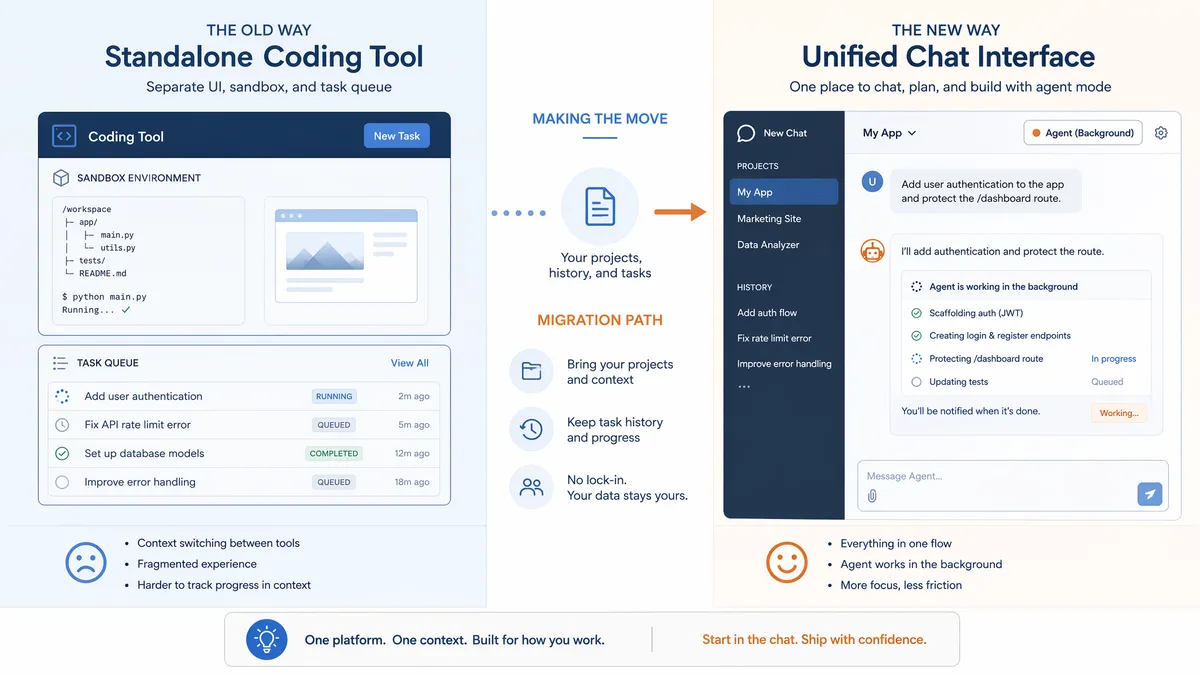
ChatGPT now: Background agent mode gives you the same sandboxed environment, but it runs within your ChatGPT conversation. You can ask follow-up questions, refine requirements, and iterate — all without leaving the interface you're already in.
My honest assessment: ChatGPT's implementation is better. The ability to say "hey, that test you wrote? add a case for empty input" without restarting a whole Codex session is a massive workflow improvement.
2. Multi-File Editing
Old Codex: Could edit multiple files in a single task, but you had to specify everything upfront.
ChatGPT now: Can edit multiple files with conversational guidance. You can point at specific files, ask Sol to compare implementations across files, and make incremental changes. The complete Sol guide covers the full range of what's possible here.
3. Autonomous Planning
Old Codex: Broke tasks into substeps and executed them sequentially. Very rigid.
ChatGPT now: Uses Sol's improved reasoning engine (the same one I analyzed in the GPT-5.5 vs Sol comparison) to plan dynamically. It can adjust its approach mid-task based on what it discovers in the codebase.
4. Test-Driven Iteration
Old Codex: Ran tests and fixed failures automatically. This was its killer feature.
ChatGPT now: Same capability, but with visibility. You can watch the test results in real-time, intervene if it's going down the wrong path, or let it run autonomously. The transparency is a huge trust builder.
The pattern is clear: everything Codex did, ChatGPT now does — often better, and always with more flexibility. The standalone product lost its reason to exist.
Why Codex Isn't Actually Dead (Yet)
Here's where I'm going to push back against the "Codex is dead" narrative, because I think people are missing something important.
Codex as a product is dying. But Codex as a concept — an autonomous, sandboxed coding agent powered by Sol — is more alive than ever. It's just wearing a different hat now.
There are still specific scenarios where the Codex-style workflow (submit task, walk away, review results) is superior to the conversational ChatGPT approach:
- Large-scale refactors: When you need to restructure a 50,000-line codebase, the dedicated sandbox with its isolated environment and guaranteed resource allocation still has advantages. ChatGPT's background agent mode is getting there, but it has timeout limits that Codex doesn't.
- CI/CD integration: Codex's API hooks for automated code review in pull requests are still more mature than anything ChatGPT offers natively. Several teams I've talked to use Codex specifically for this pipeline integration.
- Batch processing: If you need to run the same type of analysis across 20 repositories, Codex's task queue is more efficient than opening 20 ChatGPT conversations.
But here's the thing: these are power-user edge cases. For the vast majority of developers doing everyday coding work, ChatGPT's integrated approach is simply more convenient and often more capable. The hands-on review I did covers how these integrated capabilities perform in practice.
My prediction: OpenAI will eventually rebrand the Codex technology as "ChatGPT Developer Mode" or something similar, and the standalone product will quietly sunset within the next 6-12 months. The technology survives; the brand doesn't.
What This Means for Your Workflow
If you've been a Codex user, here's the practical migration path I've developed after months of using both:
Step 1: Move Daily Coding to ChatGPT
For everything you did in Codex sessions — feature development, debugging, refactoring — start doing it in ChatGPT with Sol. The conversational interface is actually an upgrade for most tasks. You can ask "why did you choose that pattern?" and get an explanation, then say "actually, use a different pattern" without restarting.
Step 2: Use Background Agent Mode for Long Tasks
For tasks that used to require a full Codex session (30+ minutes of autonomous work), use ChatGPT's background agent mode. It runs in the same sandboxed environment but gives you progress updates in your conversation thread.
Step 3: Keep Codex for Batch/CI Work (For Now)
If you're using Codex for automated code review or batch processing across repositories, keep using it until ChatGPT catches up on those specific features. Based on OpenAI's trajectory, they'll probably land in ChatGPT within a quarter or two.
The cost implications are minimal. Whether you access Sol through Codex or ChatGPT, you're consuming the same tokens at the same rates. The pricing breakdown covers this in detail. The only difference is the interface, and ChatGPT's interface is winning.
One thing I've noticed since switching: my coding sessions with Sol in ChatGPT are more exploratory. Because the friction of switching tools is gone, I'm more likely to ask "hey, what if we tried this approach?" and test it immediately. With Codex, every experiment felt like a formal submission. In ChatGPT, it's just a conversation. This shift in workflow pattern has genuinely made me more productive.
The Future of AI Coding Tools: One Interface to Rule Them All?
Zoom out from the Codex drama for a second, and you'll see a bigger pattern that's going to define the next era of AI development tools.
Every major AI company is converging on the same architecture: a unified chat interface that handles everything — coding, analysis, writing, research, automation — powered by a single model that gets routed differently based on your task.
Claude does this already. You talk to Claude about code, and it uses the same model whether you're debugging or writing docs. Gemini does the same. The distinction between "coding tool" and "general assistant" is artificial, and users know it.
OpenAI's consolidation of Codex into ChatGPT is the latest move in this convergence. The question isn't whether this will happen — it's already happening. The question is how fast.
What I Think Happens in 2026-2027
- Q3 2026: ChatGPT's background agent mode gets proper git integration (clone, branch, PR creation). This eliminates the last major advantage of standalone Codex.
- Q4 2026: OpenAI launches "ChatGPT for Teams" with shared coding contexts, replacing Codex's enterprise features.
- Q1 2027: The standalone Codex product is officially sunset. The technology lives on as "ChatGPT Developer Mode."
- Mid 2027: The entire concept of a separate "AI coding tool" feels antiquated, like how "AI spreadsheet" never became a thing — it's just a feature of the spreadsheet.
For developers, the practical advice is simple: invest in learning the unified interfaces. The companies that win will be the ones that make AI coding feel like a natural part of your development conversation, not a separate tool you context-switch to.
The Codex story isn't a death — it's an evolution. The capabilities that made Codex remarkable are now available to 8 million ChatGPT users instead of a niche audience of power users. That's not a loss. That's a win for everyone who writes code.
If you want to understand the full picture of what GPT-5.6 Sol can do now that it's been unleashed from Codex's constraints, start with the benchmark analysis for the raw numbers, then read the API developer guide for practical integration patterns. The future of AI coding isn't a separate product — it's the conversation you're already having.
Frequently Asked Questions
Is OpenAI Codex officially dead?
Not officially. Codex as a standalone product still exists in ChatGPT, but its identity has been subsumed into the broader ChatGPT experience. OpenAI hasn't announced a shutdown — instead, they've been progressively moving Codex capabilities directly into ChatGPT's interface. The coding agent now lives inside your regular ChatGPT conversations rather than requiring a separate product.
Can I still use Codex separately from ChatGPT?
Technically yes, but the experience has degraded. The standalone Codex dashboard still loads, but new features are landing exclusively in ChatGPT. OpenAI's development roadmap clearly prioritizes the unified ChatGPT interface. If you're still using standalone Codex, you're missing out on context sharing, multi-modal input, and the latest Sol reasoning improvements that are only available through ChatGPT.
Why did OpenAI merge Codex into ChatGPT?
Three reasons: user fragmentation (developers were confused about which tool to use), infrastructure efficiency (running one unified system is cheaper than maintaining two parallel products), and competitive pressure (Claude and Gemini offer coding within their chat interfaces, so OpenAI needed to consolidate). The business case for a separate coding product was weak when 90% of its capabilities were also available through ChatGPT.
Is ChatGPT's coding ability as good as standalone Codex was?
In most cases, yes. ChatGPT now uses the same Sol reasoning engine that powered Codex, with the added benefit of conversational context and multi-turn refinement. However, for very large autonomous tasks (multi-hour codebase refactors), the dedicated Codex sandbox environment still offers more control. For 95% of coding tasks, ChatGPT is now the better option.
What should Codex power users do?
Migrate your workflow to ChatGPT with Sol. The transition is surprisingly smooth — most Codex commands and patterns work identically within ChatGPT. The main adjustment is getting used to the conversational interface for code generation instead of the task-based Codex dashboard. For autonomous background tasks, use ChatGPT's new background agent mode, which replaces the old Codex sandbox.
Will OpenAI bring back a dedicated coding tool?
Possibly, but not in the same form. My prediction is that OpenAI will eventually launch a 'ChatGPT Pro Developer Mode' that combines the best of Codex (sandboxed execution, git integration, CI/CD hooks) with ChatGPT's conversational interface. Rather than a separate product, it'll be a premium tier within ChatGPT itself.