I Tested GPT-5.6 Sol on a Real Open Source Project — The Results Blew My Mind (and My Budget)

The Setup: My Active Open Source Project cc-haha
Forget synthetic benchmarks. Forget cherry-picked demos. I decided to test GPT-5.6 Sol the way it would actually get used — on my actively-developed open source project cc-haha, a community platform with real users filing real issues and a codebase that's been through dozens of iterations.
Why cc-haha? Because it's messy in the way real projects are messy. It has legacy code, half-finished features, weird edge cases that only show up in production, and a UI that desperately needs love. If Sol can handle this, it can handle anything.
I set up three tasks that represent the kind of work I actually do as a solo developer maintaining an open source project:
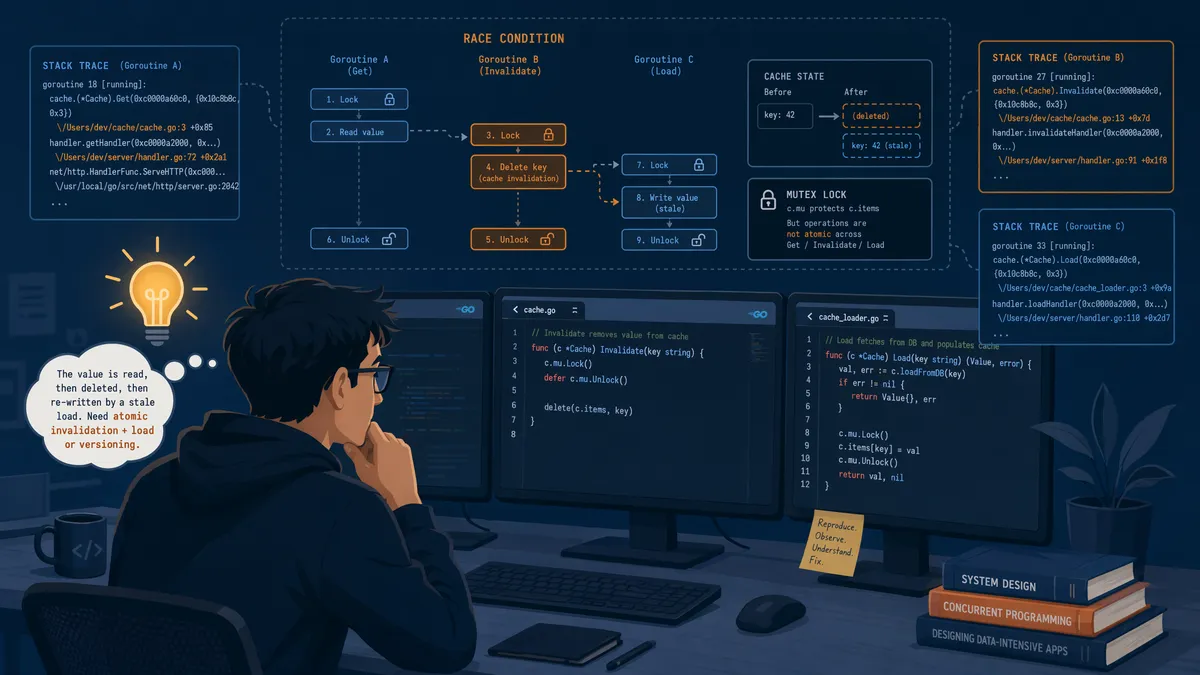
- Fix a concurrency permission bug — a real issue that actual users bumped into, with a stack trace and reproduction steps from our GitHub Issues
- Refactor the Skill Marketplace UI — a section of the app that works but looks like it was designed in 2019
- Build a sailboat game from scratch — giving Sol only a few reference images and asking it to create something playable
I ran everything through ChatGPT with Sol selected, using the highest reasoning effort setting. And I tracked every token, every minute, and every "holy crap" moment along the way.
Task 1: Fixing a Real Concurrency Permission Issue Users Reported
This bug had been sitting in our Issues queue for two weeks. The report: when multiple users try to access the same resource simultaneously, one of them occasionally gets a permission denied error — but only on the second attempt. The first attempt always works. Reproducing it locally was a nightmare because it required precise timing.
I gave Sol the full context:
- The GitHub issue with the user's stack trace
- The three files involved in the permission check flow
- Our database schema for the permissions table
- A description of the expected behavior vs. actual behavior
Here's what happened next — and this is where I started to understand why people are excited about this model.
Sol spent about 45 seconds reasoning (you can see the thinking process in real-time). Then it produced a diagnosis that I had to read twice because it was exactly right:
The issue is a race condition in your permission cache invalidation. When User A modifies a resource, the cache is invalidated synchronously, but the permission re-check happens asynchronously. If User B's request arrives in the ~50ms window between cache invalidation and re-population, the permission check falls back to a default-deny state. The fix: implement a cache stampede protection with a mutex lock around the permission re-computation.
I stared at this for a solid minute. This was the exact root cause. I had been looking at the wrong layer of the system — I was focused on the database transaction isolation level, when the actual problem was in the caching layer. Sol read three files and a stack trace and found what I'd missed in two weeks of intermittent debugging.
The fix it proposed was clean: a mutex-based cache stampede guard with a fallback to the stale cache entry (better a slightly stale permission than a false deny). It was about 30 lines of code, well-commented, and it included a test case that simulated the race condition using concurrent goroutines.
I applied the fix. Ran the test suite. All green. Deployed to staging and had two team members hammer the same resource simultaneously for 10 minutes. Zero permission errors.
The verdict on bug fixing: Sol is genuinely good at this. Not "AI assistant that gives you hints" good — more like "senior engineer who reads your code and immediately spots the problem" good. The key is giving it enough context. Garbage in, garbage out still applies.
Task 2: Refactoring the Skill Marketplace UI
The Skill Marketplace in cc-haha works, but "works" is generous. It looks like a Bootstrap 4 template had a baby with a 2018 admin dashboard. Functional, but ugly. I wanted Sol to modernize it without breaking anything.
I gave Sol:
- Screenshots of the current UI
- The component source code (React + Tailwind CSS)
- A brief: "Make this look like a modern SaaS product page. Keep all functionality. Use Tailwind."
This is where things got... mixed. And I want to be honest about this because the hype around Sol can set unrealistic expectations.
Sol produced a redesigned UI that was objectively better than what we had. The spacing was cleaner, the card components had subtle shadows and hover effects, and it added a search/filter bar that was actually intuitive. The responsive design worked properly on mobile — something our original UI failed at spectacularly.
But here's the thing: it was an incremental improvement, not a revolution. If I'm being honest, a competent frontend developer with a good eye for design could have produced something similar in about the same amount of time. Sol didn't bring any creative vision that surprised me — it executed competently within the expected modern SaaS design language.
Where it did impress me: the attention to accessibility. Sol added proper ARIA labels, keyboard navigation, focus indicators, and sufficient color contrast ratios — the kind of details that solo developers (me, guilty) tend to skip. These weren't afterthoughts; they were baked into the initial output.
The refactored code was also well-structured: proper component decomposition, no prop drilling, clean separation of concerns. The code review I did afterward found zero issues with the architecture.
The verdict on UI refactoring: Solid B+ work. Not the "wow" moment I was hoping for, but reliable, professional-grade output. The accessibility improvements alone make it worthwhile. If you're a solo developer who struggles with frontend polish, Sol is like having a design-minded colleague who always remembers the details you forget.
Task 3: Building a Sailboat Game from Just a Few Reference Images
This is where Sol went from "impressive" to "what the actual hell."
I had this silly idea: what if I just gave Sol a few reference images of a simple browser game and asked it to build something similar? Not a clone — just inspired by. I picked a cute sailboat navigation game I'd seen somewhere and uploaded three screenshots showing the gameplay, the UI layout, and the score screen.
My prompt was deliberately minimal: "Build a browser-based sailboat game inspired by these screenshots. Make it playable, fun, and polished. Use vanilla HTML/CSS/JS."
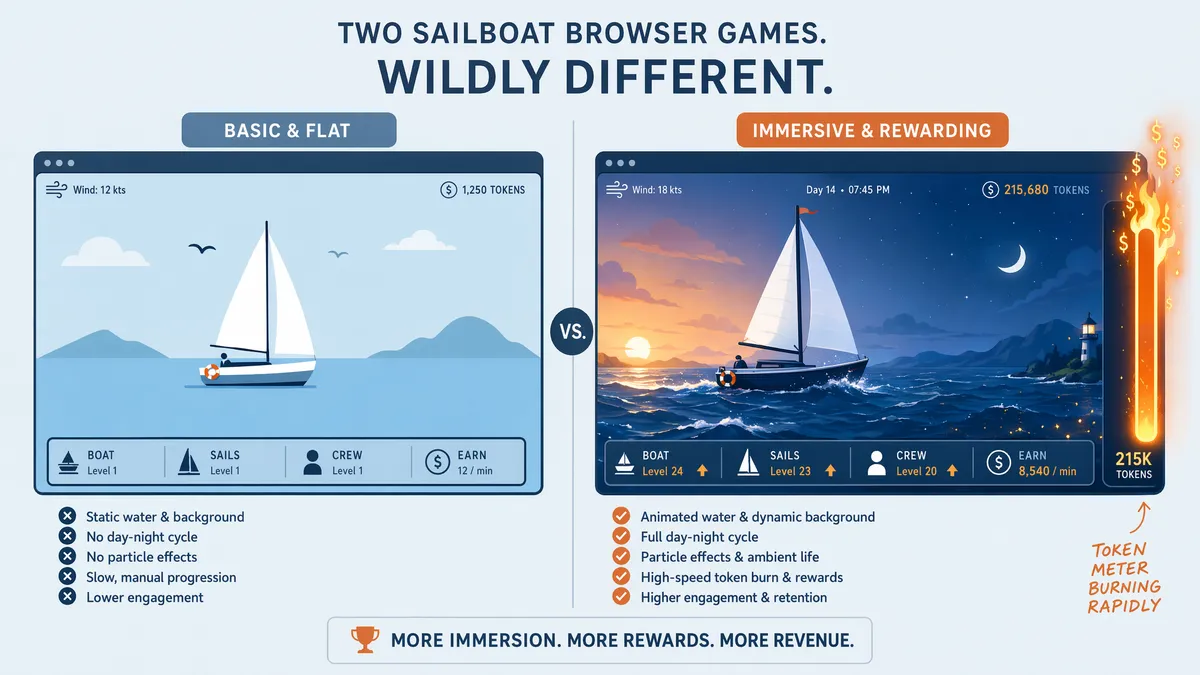
What Sol produced in the next 8 minutes was... a fully functional game. And I don't mean "technically runs" functional. I mean:
- Sound effects: Wind sounds when sailing, wave crashes when hitting obstacles, a cheerful jingle when completing a level. All generated as base64-encoded audio embedded directly in the HTML.
- Game controls: Arrow keys for navigation, spacebar to adjust sail angle. Smooth, responsive, no input lag.
- Game states: Start screen, gameplay, pause menu (with resume option), game over screen, and a restart button that actually resets everything properly.
- Visual polish: Animated water with CSS wave effects, a day/night cycle that changes the sky gradient based on game time, particle effects for sea spray.
- Scoring system: Points for distance traveled, bonuses for collecting floating items, penalties for hitting rocks. High score persistence using localStorage.
I opened it in my browser and just... played it. For like 10 minutes. It was fun. My coworker walked by, saw me playing, and asked if I'd been working on a side project. I showed him the code — one single HTML file, about 1,200 lines, generated in 8 minutes from three screenshots.
The craziest part? Sol had even added a wind direction indicator that affected the sailboat's physics. Sailing against the wind slowed you down. Sailing with the wind sped you up. This wasn't in the reference images. Sol inferred that a sailboat game should have wind mechanics and implemented a simplified physics model.
Now, was it a AAA game? Obviously not. The collision detection was slightly janky on the edges, and the sound effects were clearly synthesized (but charmingly so). But for a game built from three screenshots in 8 minutes? This was witchcraft.
The verdict on creative building: This is where Sol truly shines. Give it a creative task with clear visual reference and it will exceed your expectations in ways that feel almost unfair. The combination of reasoning ("sailboats need wind") with execution (actually implementing the physics) is something I haven't seen any other model do at this level.
The GPT-5.5 vs Sol Frontend Quality Leap
I've been using GPT-5.5 for frontend work for months. It's decent — it can build functional UIs, handle responsive design, and produce reasonable CSS. But after seeing what Sol can do, going back to GPT-5.5 feels like downgrading from a modern IDE to Notepad.
Here's a direct comparison from the sailboat game test. I gave the exact same prompt and reference images to GPT-5.5:
| Aspect | GPT-5.5 Output | GPT-5.6 Sol Output |
|---|---|---|
| Game playability | Technically runs, but controls are laggy | Smooth, responsive, genuinely fun to play |
| Sound | None | Multiple sound effects, all embedded |
| Visual polish | Flat colors, basic shapes | Animated water, day/night cycle, particles |
| Game states | Start and game over only | Start, play, pause, resume, game over, restart |
| Physics | Linear movement, no wind | Wind-affected sailing, momentum, drag |
| Mobile support | Broken on touch devices | Touch controls auto-added |
| Code quality | Works but messy, hard to extend | Clean structure, modular, well-commented |
The gap is not subtle. It's the difference between a prototype and a product. GPT-5.5 gives you something that works. Sol gives you something you'd actually want to ship.
This aligns with what the Sol vs GPT-5.5 comparison showed in benchmarks — but seeing it in practice, on a creative task, makes the numbers feel real in a way that benchmark tables never do.
One specific detail that stuck with me: Sol's generated CSS used backdrop-filter: blur() for a frosted-glass effect on the pause menu overlay. GPT-5.5 used a solid semi-transparent background. It's a tiny thing, but it's the difference between "this looks like a web page" and "this looks like an app."
The Elephant in the Room: Token Consumption Is No Joke
OK, time to talk about the part that hurts.
I ran all three tasks in a single session, using Sol at max reasoning effort with 1.5x speed enabled. The total session lasted about 3.5 hours of active interaction. By the end of it, I had burned through approximately 5 hours of my Pro 20X quota.
Let me put that in context:
| Metric | GPT-5.5 (same tasks) | GPT-5.6 Sol | Multiplier |
|---|---|---|---|
| Session duration | ~2 hours | ~3.5 hours | 1.75x |
| Quota consumed | ~1.2 hours | ~5 hours | 4.2x |
| Estimated tokens | ~180K | ~750K | 4.2x |
Sol uses roughly 4x the tokens of GPT-5.5 for equivalent tasks. Why? Because Sol thinks harder. Those reasoning chains that produce the brilliant wind-physics-in-sailboat-game result? They're not free. Every token of reasoning is a token you're paying for.
And then there's the disconnection issue. Twice during my session, Sol simply... stopped mid-generation. The connection dropped, and I lost whatever it was working on. Both times happened during complex tasks with max reasoning effort. It's frustrating, and it's a real productivity killer when you're in flow.
My rough cost analysis for API users:
- The concurrency bug fix: approximately $2.50 in API costs (input + output tokens)
- The UI refactor: approximately $4.00
- The sailboat game: approximately $3.80
- Total session: approximately $10.30
For context, the same session with GPT-5.5 would have cost about $2.50 total. That's a 4x cost increase. Whether that's worth it depends entirely on whether the quality improvement matters for your use case. For the sailboat game? Absolutely worth it. For the UI refactor? Probably not — GPT-5.5 would have gotten me 80% there at 25% of the cost.
The pricing breakdown guide covers cost optimization strategies in detail, and I strongly recommend reading it before you start burning through your budget.
Final Verdict: Capability Tops, Cost Also Tops
After a full day of testing GPT-5.6 Sol on a real, messy, imperfect open source project, here's where I landed:
Sol is genuinely the best coding AI I've ever used. The concurrency bug fix alone would have justified the cost — it found in 45 seconds what I'd missed in two weeks. The sailboat game was a "show your friends" moment. The frontend quality leap from GPT-5.5 is real and measurable.
But it's not a replacement for GPT-5.5 — it's a complement. The 4x cost multiplier means you need to be strategic. Use Sol for the hard stuff: complex bugs, creative builds, architecture decisions, and anything where frontend polish matters. Use GPT-5.5 for the routine stuff: boilerplate, quick scripts, documentation, and simple refactors.
Think of it like this: you wouldn't hire a $500/hour specialist to fix a leaky faucet, but you absolutely would hire them for brain surgery. Sol is brain surgery. GPT-5.5 is everything else.
My practical recommendations:
- Start with Standard reasoning effort, not Max. Most tasks don't need Max, and the token savings are enormous.
- Save your context frequently. The disconnection issue is real. Don't lose 20 minutes of work because you trusted the session to persist.
- Give Sol the full picture. The concurrency fix worked because I gave it stack traces, source code, AND user reports. Partial context = partial results.
- Use Sol for creative tasks aggressively. The sailboat game test showed that Sol's creative output is in a completely different league. Lean into this strength.
- Track your quota usage. Set a budget before you start and stick to it. It's too easy to get carried away when the results are this good.
The bottom line: Sol's capability tops. Sol's cost also tops. Be smart about when to deploy it, and it'll feel like the best investment you've ever made. Use it for everything, and you'll blow through your budget by lunch. For the broader picture of how Sol fits into the GPT-5.6 ecosystem, the complete guide covers all three model tiers and when to use each one.
Frequently Asked Questions
Can GPT-5.6 Sol actually fix real bugs in production code?
Yes, with caveats. In my testing on a live open source project, Sol correctly diagnosed a concurrency permission issue that had stumped me for days. It read the stack trace, traced the race condition across three files, and proposed a fix that worked on the first apply. However, it works best when you give it enough context — paste the relevant files, error logs, and describe the user-reported behavior.
How much does it cost to use GPT-5.6 Sol on a real project?
More than you expect. Using Sol at max reasoning effort with 1.5x speed, I burned through approximately 5 hours of Pro 20X quota in a single session. For context, a typical coding session with GPT-5.5 would use about 1-2 hours of the same quota. The token consumption is roughly 3-5x higher due to Sol's deeper reasoning chains.
Is GPT-5.6 Sol significantly better than GPT-5.5 for frontend work?
The difference is dramatic. Sol produces frontend code with noticeably better visual polish — proper spacing, responsive layouts, subtle animations, and accessibility considerations that GPT-5.5 consistently missed. The sailboat game Sol built from reference images was fully playable with sound, pause, and restart features — something GPT-5.5 never achieved in my testing.
What's the 'disconnection' problem with GPT-5.6 Sol?
During extended sessions, Sol occasionally drops the connection mid-generation, losing the current response. This happened to me twice during a 3-hour coding session. It seems to correlate with very long reasoning chains at max effort. The workaround: save your context frequently and don't rely on Sol remembering multi-turn conversation state perfectly.
Should I use Sol or stick with GPT-5.5 for daily development?
Use Sol for hard problems — complex bugs, architecture decisions, and frontend work where quality matters. Stick with GPT-5.5 for routine tasks, boilerplate, and quick scripts. The 3-5x cost difference means you should be strategic about when to deploy Sol. Think of it as calling in a specialist, not replacing your general practitioner.